Draft, research, and revise long documents in one editor
Inkpad.ai is an AI document editor built for long, high-stakes writing. Autocomplete stays in your voice, web research comes with citations, and every AI change waits for you to approve it.
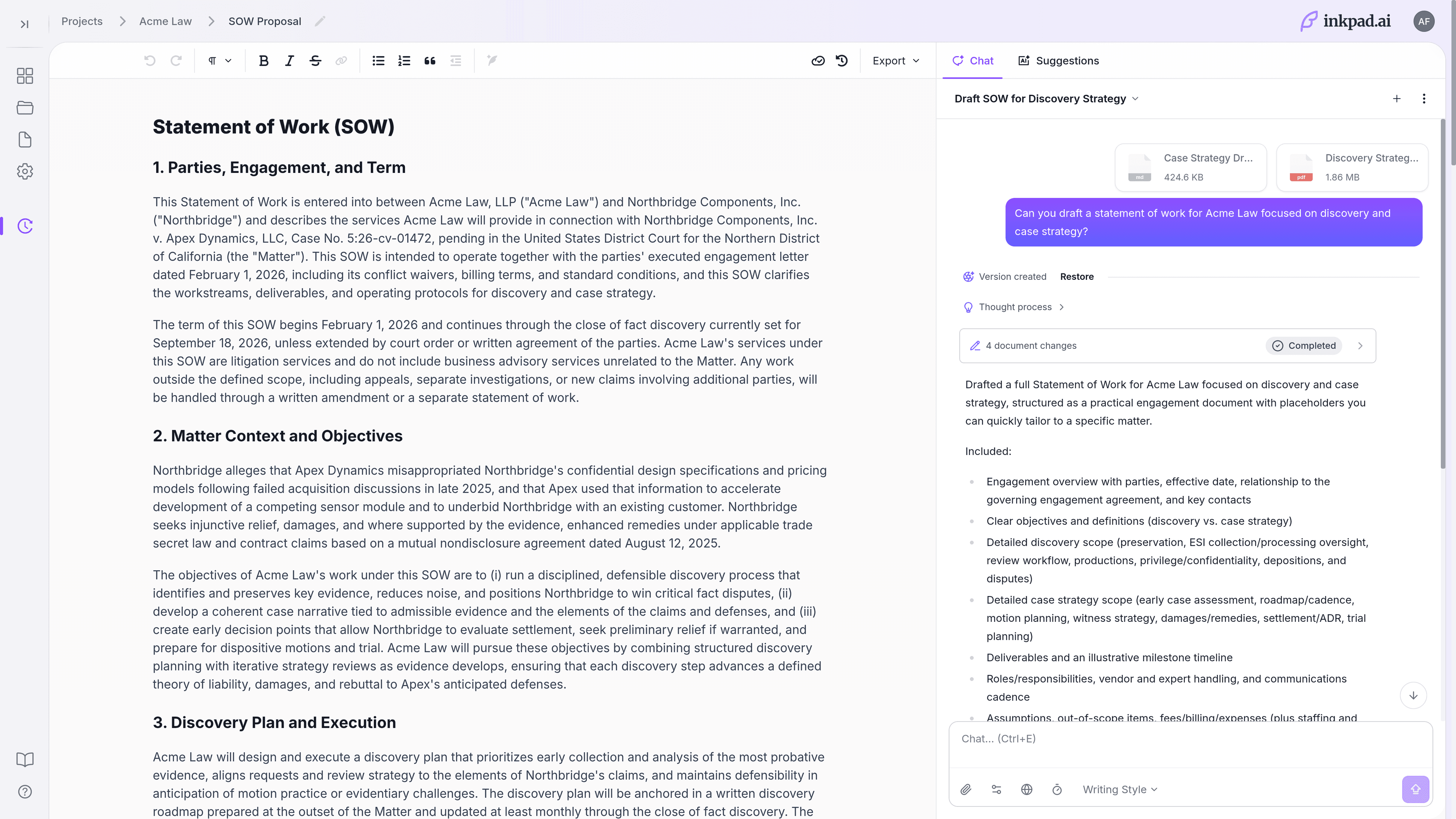
Change one section at a time. The content you've already approved stays untouched.
Review and proofreading run when you ask. You accept only the suggestions you want.
Search the web with citations, and keep saved sources linked to your document.
Your workspace data stays private and is never used to train AI models.
Most AI writing tools speed up drafting, then slow down everything after
Inkpad.ai fixes the four things that turn reviews into rewrites: generic output, scattered context, risky rewrites, and problems you catch too late.
Set a voice profile and style rules, then let autocomplete keep every draft on voice from the first sentence.
Attach files, notes, and links, then research the web with citations so your facts stay grounded and reusable.
Change only the sections that need it with Deep Edit, and restore any earlier version if the direction shifts.
Run review and proofreading checks before anyone else sees the draft, not after.
From first draft to final file, in one editor
Generate a draft, keep it in your voice, research with sources, revise only what needs it, and export clean files — without leaving Inkpad.ai.
Draft With AI
Start from a brief: Tell Inkpad.ai what you want to write, in a sentence or two.
It asks a few questions: Length, audience, and the key facts to include.
Grounded in your sources: Draws on your project knowledge and voice profile, not generic filler.
A full first draft: A complete document you can edit, not a reply to paste and clean up.
Generate a full first draft from a brief
Tell Inkpad.ai what you need to write. It asks a few quick questions, then drafts the whole document from your sources and chosen style — a draft you can edit, not a chat reply to paste and clean up.
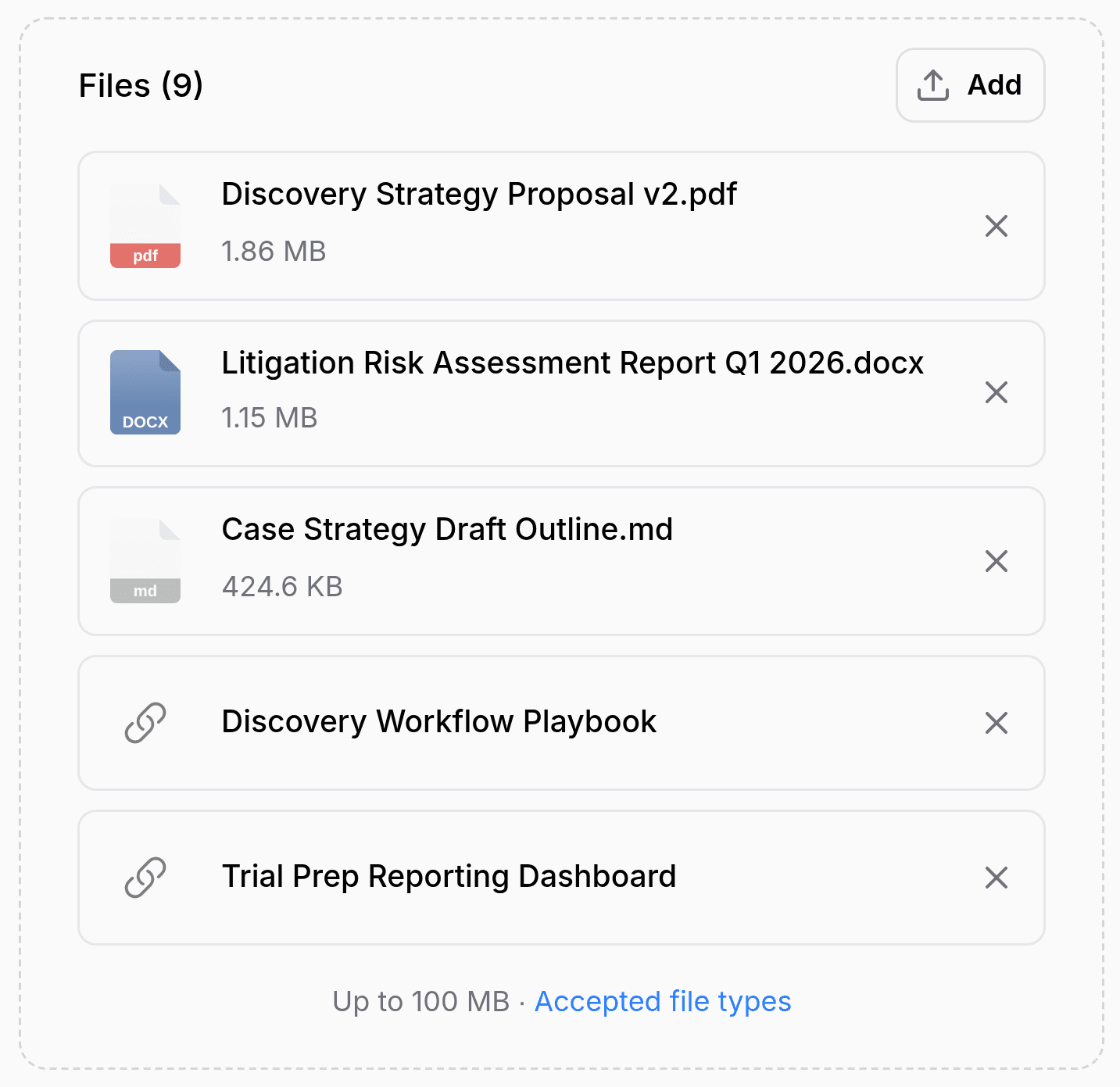
Draft in your voice with inline autocomplete
Build a voice profile from your past writing, pick from nine writing styles, and let autocomplete finish sentences and paragraphs that still sound like you.
Quality Review
Automatic suggestions: Flag clarity, tone, and consistency issues before anyone else reviews the draft.
Advanced proofreading: Catch grammar slips, repetition, inconsistent terms, and hard-to-read passages.
Reviewable changes: See every suggestion and choose what to apply.
Run automatic review and advanced proofreading
Check clarity, consistency, terminology, and readability in one pass, then decide on each suggestion before it's applied.
Source-Backed Research
Advanced web research: Search the web inside your workspace instead of jumping across tabs.
Saved sources: Save snippets and references so you can reuse them across drafts.
Linked citations: Every source stays connected to the claim it backs up as you write and revise.
Research the web with citations
Search the web without leaving your document, save the sources you use, and keep them linked to the claims they support.
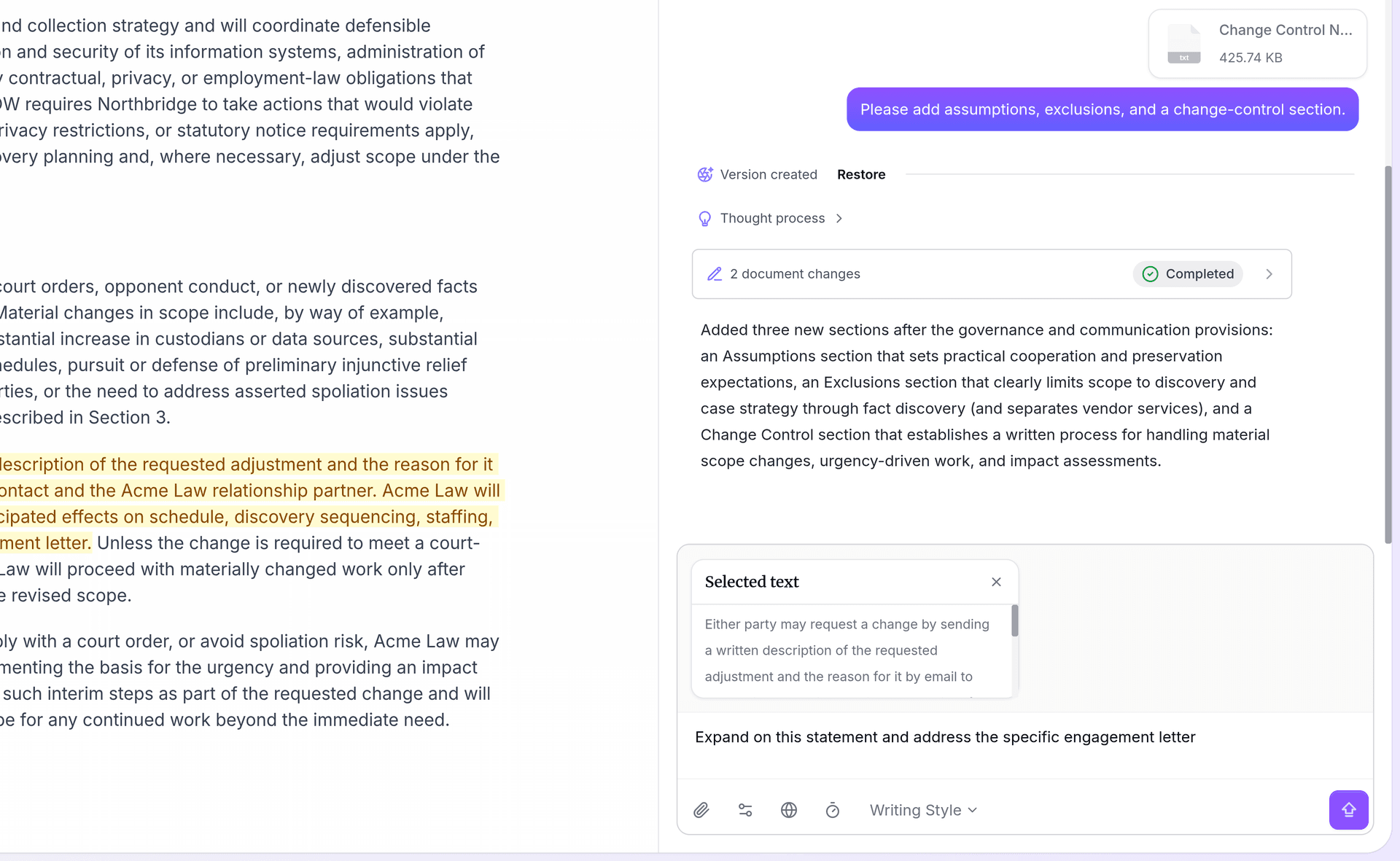
Rework tough sections with Deep Edit
Rework a tough section's structure, clarity, and tone in several passes, without touching the rest of the document.
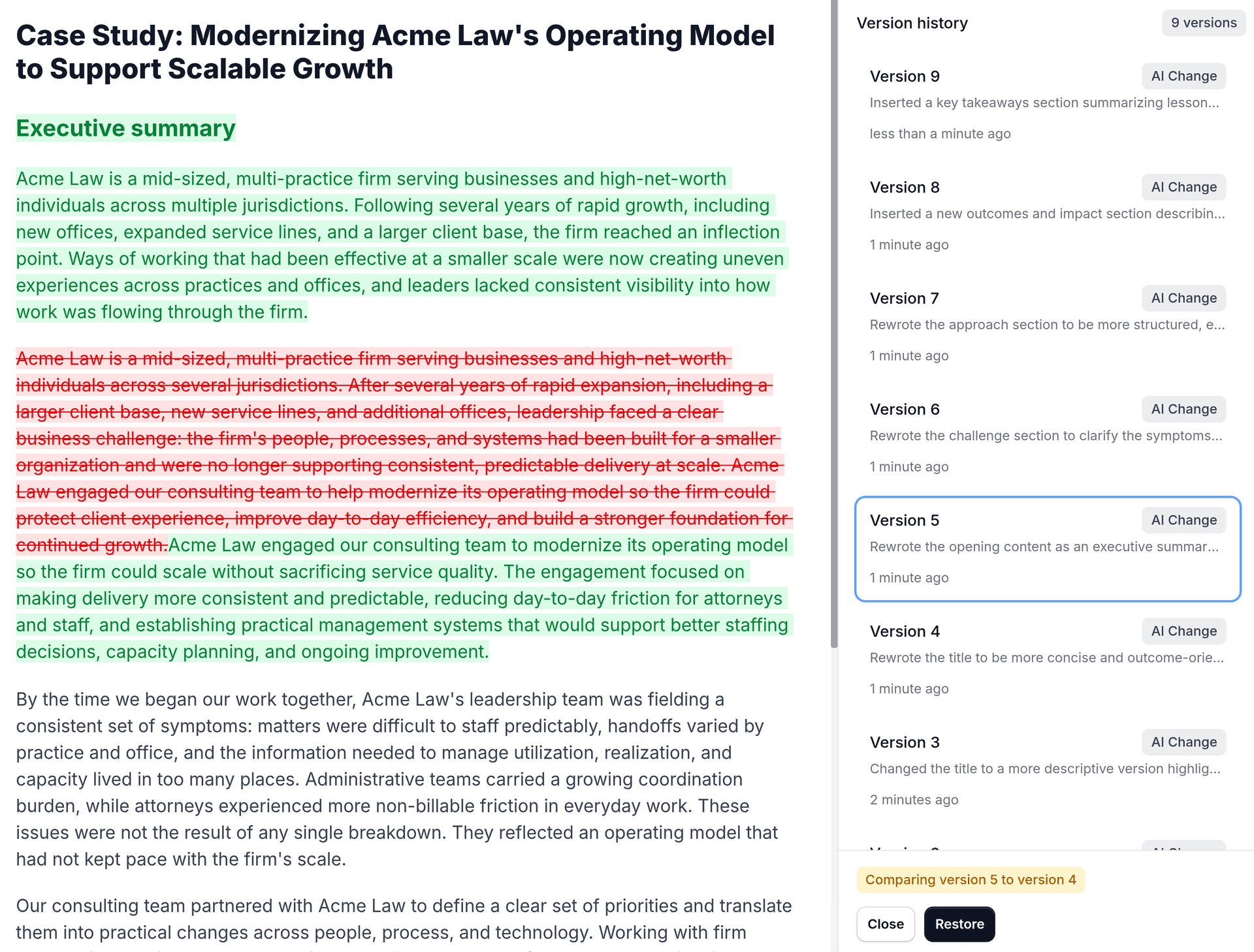
Edit one section and keep every version
Edit a selected range, compare revisions side by side, and restore any earlier version when feedback conflicts.
Find Anything
Full-text search: Find words and phrases inside every document, not just titles.
Across every project: One search covers all your projects and drafts.
Jump straight to it: Open the exact document and pick up where you left off.
Find anything across your projects
Search the full text of every document and project. When you know you wrote something but not where, find it in seconds instead of scrolling through old drafts.
Familiar Editor, Clean Exports
Microsoft Word: For executive, legal, and client reviews.
PDF: For final approvals, external handoff, and records.
Markdown: For docs sites, repositories, and publishing.
OpenDocument: For teams that don't run on Microsoft formats.
Your data stays private: Workspace data is never used to train AI models.
Finish in a Word-like editor and export cleanly
Import an existing Word file to keep going, work with headings, tables, and comments like you would in Word, then export clean files in the formats your team already uses.
Before and after: how real teams use Inkpad.ai
Each one starts from material a team already has and ends with cleaner drafts, fewer rewrites, and exports ready to send.
Consulting proposals and deliverables
Before: partner and client feedback meant rewriting the whole document, often at the last minute.
After: teams run Deep Edit on the sections that matter, make targeted changes, and can roll back to any earlier version.
Agency and B2B content teams
Before: first drafts sounded generic, and editors burned time rewriting them into each client's voice.
After: voice profiles, style rules, and autocomplete keep drafts on voice before review even starts.
Technical documentation owners
Before: release notes were scattered across specs, notes, and browser tabs, so long docs drifted out of sync.
After: research with sources, proofreading checks, and clean Markdown export keep docs accurate and ready to publish.
| Compare features | Chat-first AI tools | Inkpad.ai |
|---|---|---|
| Drafting workflow | ||
| Full first draft generated from a brief | Prompt, then paste and clean up | |
| Import an existing Word document to edit | ||
| Word-like editing for long documents | ||
| Inline autocomplete | ||
| Voice and style controls | Depends on the prompt, and inconsistent | |
| Project knowledge from your files, text, and links | You re-explain context each time | |
| Quality and revision control | ||
| Automatic review suggestions | Manual back-and-forth prompting | |
| Advanced proofreading and analysis | Manual checks | |
| Range editing for selected sections | ||
| Compare history and restore prior drafts | ||
| Research and delivery | ||
| Advanced web research with citations and saved sources | Copy-paste from other tabs | |
| Deep Edit for complex multi-pass rewrites | One-pass rewrites | |
| Full-text search across your projects | ||
| Export options | Copy-paste, then clean up by hand | Word, PDF, Markdown, OpenDocument |
| Privacy for sensitive documents | Varies by workspace | Workspace data stays private and is never used to train AI models |
| Drafting workflow | |
|---|---|
| Full first draft generated from a brief | Prompt, then paste and clean up |
| Import an existing Word document to edit | |
| Word-like editing for long documents | |
| Inline autocomplete | |
| Voice and style controls | Depends on the prompt, and inconsistent |
| Project knowledge from your files, text, and links | You re-explain context each time |
| Quality and revision control | |
| Automatic review suggestions | Manual back-and-forth prompting |
| Advanced proofreading and analysis | Manual checks |
| Range editing for selected sections | |
| Compare history and restore prior drafts | |
| Research and delivery | |
| Advanced web research with citations and saved sources | Copy-paste from other tabs |
| Deep Edit for complex multi-pass rewrites | One-pass rewrites |
| Full-text search across your projects | |
| Export options | Copy-paste, then clean up by hand |
| Privacy for sensitive documents | Varies by workspace |
| Drafting workflow | |
|---|---|
| Full first draft generated from a brief | |
| Import an existing Word document to edit | |
| Word-like editing for long documents | |
| Inline autocomplete | |
| Voice and style controls | |
| Project knowledge from your files, text, and links | |
| Quality and revision control | |
| Automatic review suggestions | |
| Advanced proofreading and analysis | |
| Range editing for selected sections | |
| Compare history and restore prior drafts | |
| Research and delivery | |
| Advanced web research with citations and saved sources | |
| Deep Edit for complex multi-pass rewrites | |
| Full-text search across your projects | |
| Export options | Word, PDF, Markdown, OpenDocument |
| Privacy for sensitive documents | Workspace data stays private and is never used to train AI models |
Frequently asked questions
The questions teams ask before rolling out Inkpad.ai.
Start your next long document with less rewriting.
Import a Word file or start from a blank page, then draft, research, review, and export in one editor.